
BYU Commencement 2026
The ticket claim is now closed
How to claim tickets:
I’ve gotten tickets (or a ROC Pass) through BYU Tickets before
- Click on “BYU Student Sign In” under the “My Account” tab on byutickets.com.
- Sign in with your email and password.
- Click "Find Tickets" under "BYU Commencement 2026". (Three tickets max per student. Tickets are for your guests. Students do not need tickets to get in themselves.)
I’ve Never Signed into my BYU Tickets Student Account
- Click on “BYU Student Sign In” under the “My Account” tab on byutickets.com.
- Enter your byunetID@byu.edu email address.
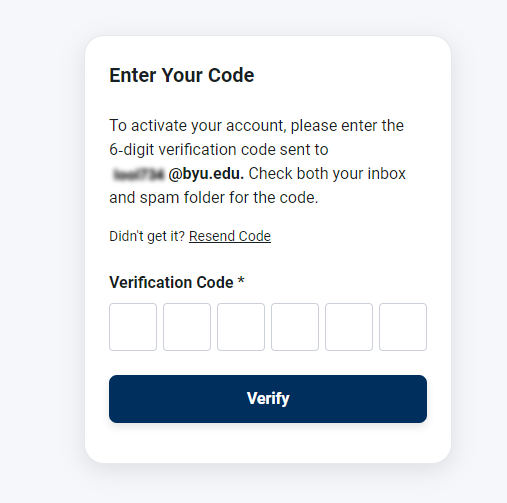
- Activate your account by clicking “Send Me a Code” and entering the one-time code sent to your BYU email.
- Go to “My Account” and click “Edit” under “My Profile” or click “Account Settings” to create your password.
- Log Out of your account and then log back in by clicking on “BYU Student Sign In” under the “My Account” tab.
- Sign into your account with your email and password.
- Click "Find Tickets" under "BYU Commencement 2026". (Three tickets max per student. Tickets are for your guests. Students do not need tickets to get in themselves.)
My BYU Tickets account email is different than my netID@byu.edu email (see pictures below)
- Click on “BYU Student Sign In” under the “My Account” tab on byutickets.com.
- Enter your netID@byu.edu email address and follow the steps below.
- Follow the applicable steps above.


Thursday, April 23 at 10 a.m. MT | Marriott Center
Students
Your tickets to 2026 Commencement will be available to transfer from your BYU Tickets account on April 20. Your guests will need to accept the transfer and download their tickets to their mobile phones. (As the graduate, you do not need a ticket to attend.)
Only mobile tickets (no physical tickets) will be accepted at commencement. Please make sure that your guests understand how to download and use their mobile tickets.
We recommend that you transfer your tickets to your guests as soon as possible. Please don't wait until the day of commencement. To transfer your tickets, simply log in to your BYU Tickets account, go to "My Account," and select "Transfer Tickets." Then, enter the email address or mobile phone number of the person to whom you would like to send the ticket(s). They will need a BYU Tickets account to accept the transfer. If they do not have one, they will be prompted to create one. For any other questions regarding mobile tickets, visit our mobile ticket guide.
Guests
Mobile Tickets
Only mobile tickets (no physical tickets) will be accepted at commencement. Please make sure that you download your mobile tickets before the day of the event. You may also transfer tickets to other guests that may be arriving at different times. If you are a graduating student, please transfer your tickets to your guests, you do not need a ticket.
Event Details
2026 BYU Commencement: Thursday, April 23 at 10 a.m. MT | Marriott Center
Entry and Seating
- Doors open at 8:30 a.m.
- All guests must be seated by 9:30 a.m.
- Saving seats is not permitted
- Ticket does not guarantee admission. All tickets are general admission (first come, first served) including ADA seating.
- There will be a stand-by ticket line outside the Marriott Center Annex for those who do not have tickets
Commencement will be broadcast live for those who cannot attend:
- BYUtv (byutv.org)
- BYU Radio
- Classical 89 KBYU-FM
The broadcast will also be available to stream on the BYUtv app and website for approximately one month after the event. A free BYUtv account is required to watch. For help, contact BYUtv at byutv@byu.edu or 1-866-662-9888.
Marriott Center
No Bags
- The Marriott Center has a NO bag policy. Small clutch bags no larger than 5” x 8” x 1”, with or without a handle or strap can be taken into the venue.
- Medically necessary items (including diaper bags) will be permitted after inspection. One bag per person.
- No outside food or drink is permitted inside the Marriott Center. Empty water bottles are allowed.
Prohibited Items
- Please do not use loud noisemakers (air horns, cowbells, etc.) as they disrupt the ceremony and make it difficult to hear graduates' names.
- Pets and ESA animals are not permitted. Service animals as defined by the ADA are welcome.
- Signs or banners larger than 24”x36”
- Other large items
- Food or drink (including bottled water)
- The following items are permitted after inspection:
- Medical Supplies
- Blankets
- Baby supplies
Weapons Detection
- BYU is employing the use of a weapons detection system. Please arrive early to facilitate faster entry into the venue.
- Weapons of any kind are not allowed at the Marriott Center. See a full list of prohibited items below.
Accessibility and Special Accomplishments
Seating
- ADA seating is accessible via the concourse level inside portals F, H, L, T, and Y.
- Elevator access is available on the north side of the Marriott Center at the ticket level.
Wheelchair Loans
- A limited number of wheelchairs are available to borrow at the Guest Services booth between portals A and Y on the northeast side of the Marriott Center.
- Please bring a driver's license to leave as collateral.
Contact for Special Needs
- Graduates: Contact the Accessibility Center at 801-422-2767
- Guests: Contact the Special Events Office at 801-422-6022
Tailgating
Keep tailgating within the designated areas below

Parking
- Lots 1–17 and Lot 50 are reserved for university employees on event day.
- All other areas on campus can be used for guest parking (red)
- ADA parking is served at the Marriott Center parking lot (blue)
- Interactive parking map can be found at https://map.byu.edu/?layer=parking
- For questions, contact Parking Services at 801-422-8754.
- The Marriott Center is located on the campus of Brigham Young University in Provo, Utah at 701 E University Parkway. From Interstate 15, take exit 269 (University Parkway) and head east. It is a straight 4-mile drive to the arena.

Shuttles
- BYU provides a commencement shuttle on event day. See below for the shuttle map and route.

Public Transportation
- The UTA Utah Valley Express (UVX, Route 830X) runs through Provo and Orem and stops near campus, with buses arriving every 6–10 minutes.
Connect to Frontrunner commuter rail at Provo Central Station or Orem Central Station.
- Visit rideuta.com for schedules, maps, and trip planning.